


Gallery
4.3474.00 Reviews
App Specs
- Version
- 8.0
- Updated On
- License
- Free
- Downloads
- 1,000,000+
- Developer
- Gallery Pro - Photo Album Manager
- Categories
- Photography
- Platform
- Android
Screenshots

 Analysis by AppCompare
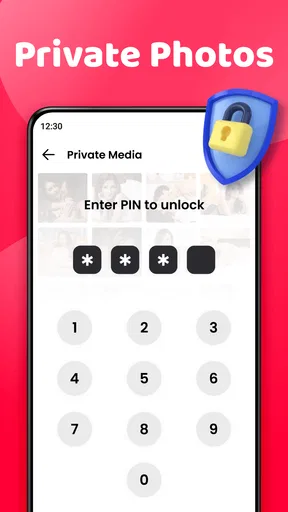
I judge a photo app less by how many tools it advertises than by whether it makes a crowded camera roll easier to live with. Gallery is a photography app from Gallery Pro - Photo Album Manager, and its central appeal is practical: it brings image and video browsing together with a photo vault and gallery lock. That privacy angle matters most when someone else occasionally handles your phone, but it also changes how I think about the app. This is not simply a place to admire pictures; it is meant to help manage a library that may include things I would rather not leave in plain view.
A gallery with privacy built into the pitch
The everyday photo library is usually a mix of family pictures, screenshots, documents, receipts, and videos. A dedicated vault can help separate sensitive or personal images from that casual stream. I find that more useful than another decorative way to browse the same recent shots: if a phone is passed around to show a picture, a locked area can offer a boundary between what I intend to share and what I want to keep private.
The important distinction is that a gallery lock is a convenience and privacy layer, not a substitute for a complete backup strategy. I would not treat a vault as proof that an image is safely stored forever, or assume it protects every copy that might exist elsewhere. Before moving anything important, I would check how the app handles access and make sure I still have a separate copy if losing the phone or changing devices would be a problem.
How I would make the vault useful
I would begin with a small, deliberate group of images rather than trying to reorganize an entire camera roll at once. For example, I might set aside personal documents photographed for reference, private family pictures, or images I do not want appearing while someone scrolls through recent photos. Keeping the selection narrow makes it easier to remember what I moved and to decide whether the vault is genuinely helping.
A useful habit is to review the protected collection when I have a quiet moment, not while someone is waiting for me to find a picture. That gives me time to confirm that the images I meant to keep private are in the right place and that the ordinary gallery still contains the photos I want to browse or share. The trade-off is a little extra upkeep: privacy tools are only helpful when I remember where I put things.
For a shared-phone moment, the difference is straightforward. A friend asks to see a photo from a meal, and I can open the relevant picture without handing over an unfiltered tour of the rest of my library. That does not make every accidental reveal impossible, but it gives me a more intentional way to keep private material apart from the pictures I regularly show.
What to expect from a dedicated photo app
Compared with the photo viewer already on a phone, a separate gallery app has to earn its place. The built-in option may be the better choice if I only need to open recent pictures, rely on a platform’s existing photo search, or prefer to keep everything within one familiar system. This app is more appealing when the photo vault and gallery lock are the deciding needs, rather than when someone is looking for an entirely new way to edit or discover images.
Worth Reading Before You Choose

EA SPORTS FC Mobile 26 Is a Bigger Football Game, but It Takes Time

Flipboard Shows What News Apps Must Do Beyond the Feed

Switching to Android Auto Means Rethinking Your Driving Routine

Google Calendar Makes a Crowded Week Easier to Manage

Ludo King Makes the Most of the Minutes Between Plans

Baby Panda World Brings Quick Play to Modern Phones, but Its Game Library Feels Busy
It is also different from cloud photo services, whose main draw is usually syncing and access across devices. A local gallery can feel more direct for browsing what is on the phone, while cloud storage is often the more suitable answer for keeping a library available after a device change. I would choose based on the job: use a locked gallery to manage visibility on the handset, and use a dependable backup approach for preservation. Neither role automatically replaces the other.
Small choices that prevent bigger hassles
Before putting files behind a lock, I would check that I understand how to get back to them and what happens if I switch phones or remove the app. That is not a claim about a particular transfer method; it is a sensible precaution for any app that holds material I care about. If the images are irreplaceable, I would keep another copy in a place I control rather than relying on one app alone.
I would also think carefully about what belongs in a vault. Locking every image can make everyday browsing feel cumbersome, especially if I frequently need to retrieve screenshots or reference pictures. Protecting only the items that truly need privacy creates a clearer distinction and makes the feature less of a hurdle. A vault should reduce the chance of an awkward reveal, not turn ordinary photo access into a chore.
The app is free to install, though in-app purchases range from $0.99 to $39.99 per item. It has an Everyone content rating, a 4.3 average from around 25,000 ratings, and more than a million installs. Those figures suggest that it has reached a sizeable audience, but they do not tell me whether its particular approach suits my habits. I would decide by testing whether the lock-and-vault workflow feels easier than relying on the phone’s usual gallery controls.
It was released on June 8, 2021, and its current version is 8.0, with Android 8.0 as the minimum operating system. Those details are useful when checking whether an older device can run it. The developer is Gallery Pro - Photo Album Manager. If I were choosing it for a family member, I would first make sure their phone meets the system requirement and that they are comfortable managing a separate protected collection.
Getting Started with Gallery
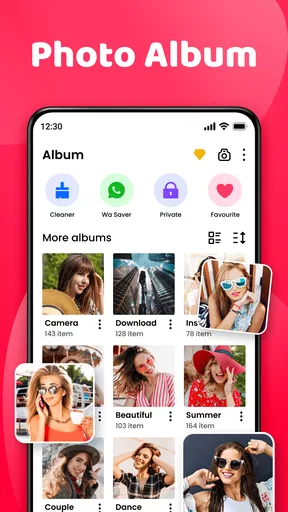
First things first, downloading and setting up Gallery is a breeze. Head to your app store, find the app, and with a couple of taps, you're all set up. Right off the bat, the interface is sleek and intuitive. You know those apps that require a degree in tech to navigate? This isn’t one of them. It's like the app anticipates what you need and lays it out in the simplest way possible.
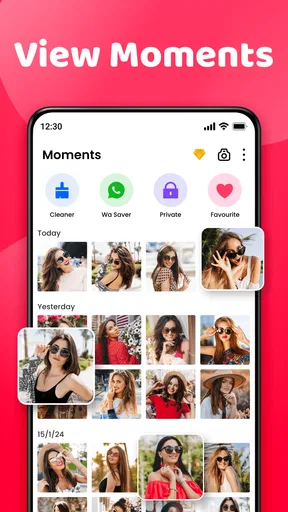
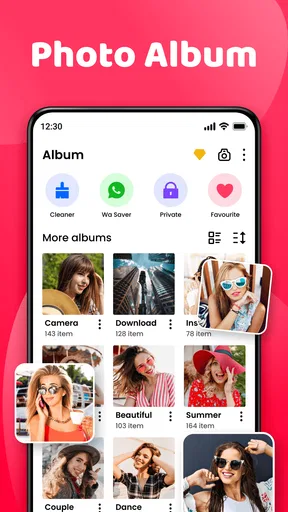
Once you're in, Gallery prompts you to grant access to your photos. Don’t worry, it’s all about making your life easier. Trust me, this app respects your privacy. After you've given the thumbs up, it automatically organizes your photos by date, location, and even by the people in them! Say goodbye to endless scrolling to find that one picture from last summer.
Features That Stand Out
Now let’s talk features. The app isn’t just about organization; it's packed with tools that make your photos shine. Ever wanted to create a quick slideshow of your beach vacation? With the slideshow feature, you can whip one up in seconds. And it’s not just a basic slideshow; you can add music, select custom transitions, and even include text. Fancy, right?
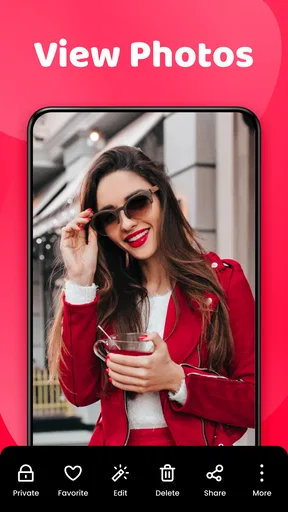
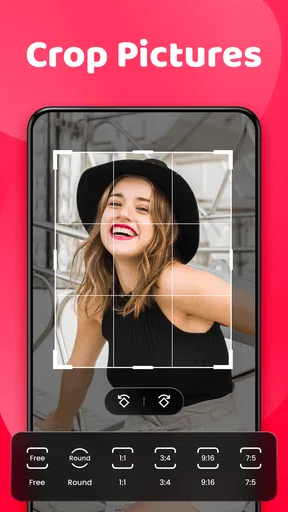
Another nifty feature is the photo editor. While it’s not Photoshop, it has all the basics covered. Adjust brightness, contrast, crop, and add filters with just a few taps. The editor is perfect for those quick tweaks before you share your masterpiece on social media.
What really blew me away was the app's AI-powered search. You can type in "birthday," and it'll pull up all your birthday shots. It's like having your own personal assistant who knows exactly where everything is. Gallery takes the guesswork out of finding your photos, making it a real game-changer.
The User Experience
So, how does it feel to use Gallery every day? In a word: seamless. The app runs smoothly, and I haven’t experienced any lag or crashes. It’s like the developers truly understand the importance of a hassle-free user experience. Everything is where you expect it to be, and the app is responsive to every swipe and tap.
One of the highlights is the "Memories" feature. Every so often, Gallery will surprise you with a throwback to a special day. It’s like a gentle nudge from the past, reminding you of moments you might have forgotten. It’s those little touches that make you appreciate the app even more.
Is it the right fit for my photo habits?
Putting those browsing and editing claims aside, I would choose this app primarily when I want a gallery that also gives private images a separate, locked place. Someone who takes plenty of casual photos and occasionally lends out their phone may appreciate that combination. A person who mainly needs cloud syncing, professional editing, or a simple viewer with no extra management steps may be happier sticking with a built-in gallery or choosing a service designed around those priorities.
My practical recommendation is to start with the task that brought you here. If it is keeping a handful of personal pictures out of ordinary browsing, test that workflow first and see whether it feels natural. If the real problem is finding old images, try the browsing and search tools with a small set of familiar photos before expecting them to solve every organizational problem. A good gallery should save effort in the situations you actually face, not merely offer a long feature list.
Is Gallery worth the download? Absolutely. It’s more than just a photo storage app; it’s a complete photo management solution. Whether you’re a casual snapper or a photo hoarder, this app has something for everyone. It's easy to use, packed with features, and respects your privacy.
If you’re ready to take control of your photo chaos and find joy in your photo library again, give it a shot. You might just find yourself wondering how you ever managed without it.
Pros
- User-friendly interface enhances navigation.
- Supports various image and video formats.
- Includes robust editing tools.
- Seamless integration with cloud storage.
- High customization options for personalization.
Cons
- Contains ads that can disrupt usage.
- Limited free storage space available.
- Some features require in-app purchases.
- Occasional lag with large file sizes.
- Privacy concerns with data permissions.
FAQs for Gallery
What features does the Gallery app offer for organizing photos?
The Gallery app provides intuitive features like album creation, tagging, and facial recognition. Users can easily sort and organize photos by date, location, or custom tags. Additionally, the app offers a search function, allowing users to quickly find images using keywords. These features make managing large photo collections seamless and efficient.
Can I edit photos directly within the Gallery app?
Yes, the Gallery app includes a built-in photo editor with various tools. Users can crop, rotate, adjust brightness, contrast, and apply filters. Advanced features like red-eye correction and blemish removal are also available, allowing for comprehensive photo enhancements without needing third-party applications.
How does the Gallery app ensure the privacy of my photos?
The Gallery app prioritizes user privacy with features like password protection and private albums. Users can choose to encrypt sensitive photos, keeping them hidden from unauthorized access. Additionally, the app supports cloud backup with encryption, ensuring that your photos remain secure both on your device and in the cloud.
Is the Gallery app compatible with all photo and video formats?
The Gallery app supports a wide range of photo and video formats, including JPEG, PNG, GIF, MP4, and more. This compatibility ensures that users can view and manage all types of media files without the need for additional software, providing a seamless user experience across devices.
Does the Gallery app offer any sharing options for photos?
Yes, the Gallery app allows users to share photos directly through various platforms. Users can send images via email, social media, or messaging apps with a few taps. The app also supports creating shareable links, making it easy to distribute albums or individual photos to friends and family securely.


